
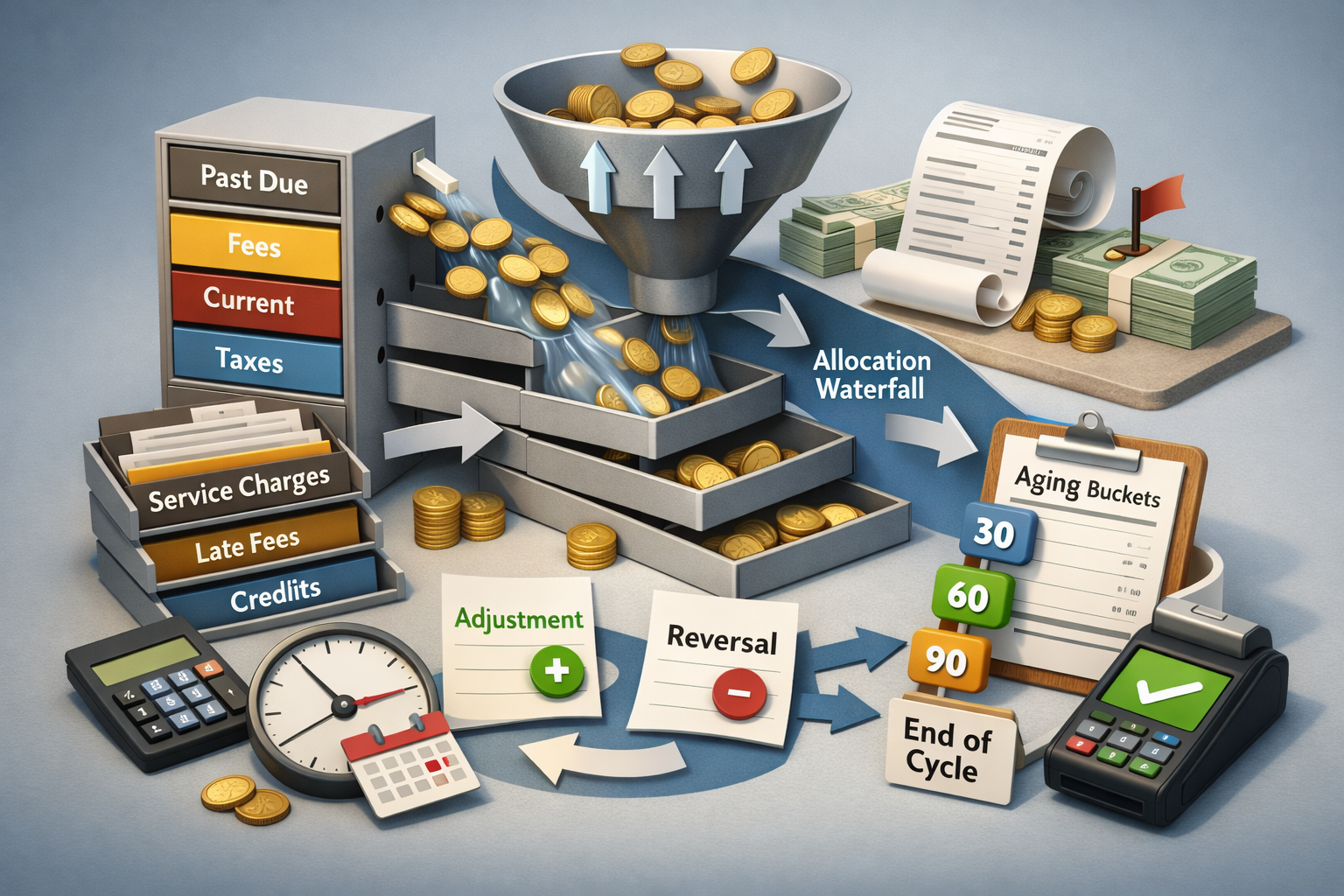
How Consumer Billing Systems Allocate Payments and Adjustments is easiest to follow when you treat billing as an accounting engine with a strict ordering of rules. What customers see in a portal is a summary layer. Underneath, the platform posts transactions into segmented buckets, applies hierarchy tables, then rolls everything into statement totals at defined cutoffs.
In most U.S. billing platforms, “allocation” is not a single action; it is a sequence of postings that must be auditable. That is why the same payment can appear “received” while the displayed balance looks unchanged for a period of time, or why an adjustment shows up as a separate line item rather than replacing the original charge.
This guide explains How Consumer Billing Systems Allocate Payments and Adjustments from a system perspective (ledger design, sequence rules, timing). It intentionally does not walk through dispute escalation steps, which are covered in billing dispute escalation process step by step. Here, the focus is the internal mechanics that produce the numbers on a bill.
Many applied outcomes on this site map back to the structures below, including water bill payment not credited, gas bill payment not applied, subscription refunded but card not credited, subscription charged twice, and mobile bill balance wrong amount. Those pages analyze scenarios; this page explains the architecture that makes those scenarios predictable.
Key Takeaways
- Allocation is rule-driven and usually configured by product class (plan type), not by individual account.
- Balances are segmented into internal sub-ledgers; the visible total is often a roll-up.
- Posting order (timestamp + batch windows) can change what appears on a statement versus what exists in the ledger.
- Adjustments (credits/debits) are not the same as payments; they follow different posting and matching logic.
- Proration is typically calculated before payment waterfalls apply, and it can post as separate adjustment lines.
1) The Billing Data Model: One “Balance” Is Many Buckets
How Consumer Billing Systems Allocate Payments and Adjustments starts with a simple truth: most consumer billing systems do not store one balance. They store multiple balances that roll up into a presented total. Common internal segments include service charges, taxes, surcharges, equipment installments, one-time fees, late fees, deposits, credits, and “unapplied cash.”
These segments are sometimes called sub-ledgers or charge buckets. The platform posts each transaction to a specific bucket first, then performs roll-up calculations. This design supports audits, regulatory reporting, and plan-specific accounting. It also means a customer may see a payment confirmation while a particular bucket remains unchanged until posting and allocation rules run.
If a portal shows a “total due,” it is usually a computed summary of multiple internal ledgers. When you understand that segmentation, many “why didn’t my balance move?” moments become timing or routing questions rather than mysterious errors.
What to Understand: Segmentation is a feature, not a bug. It keeps taxes, penalties, and service revenue separately traceable.
Real-world example : A utility account can show a payment “received” while the delinquent-fee bucket remains open until nightly allocation completes.
2) The Allocation Waterfall: Where Payments Go First
How Consumer Billing Systems Allocate Payments and Adjustments is defined by an allocation “waterfall” (priority ladder). This ladder dictates the order in which a payment reduces buckets. A common ordering in U.S. environments is: past-due amounts first, then fees/penalties, then current service charges, then taxes/surcharges (or the reverse, depending on jurisdiction and configuration).
Telecom and subscription systems frequently add plan-specific buckets (device payments, add-ons, premium features). Utility systems frequently add regulated components (delivery charges, generation charges, riders). The waterfall can differ by product, by state, and by billing platform configuration. Two customers paying the same amount can see different reductions because the platform applies different priority sets.
The key point is that payment allocation is typically automated and deterministic. Once a payment enters the ledger, the system applies it using rules that are meant to be consistent and auditable—sometimes at the expense of customer intuitiveness.
What to Check: Whether the platform allocates to “oldest invoice first” (aging) or to “category priority” (fees/taxes/service).
Real-world example : A partial payment may reduce late fees and past-due charges while leaving “current month service” looking unchanged in the portal.
3) Posting Windows, Batch Runs, and Statement Cutoffs
How Consumer Billing Systems Allocate Payments and Adjustments is shaped by timing. Many billing systems post in batches (e.g., overnight) even if they accept payments in real time. Payment processors may confirm authorization immediately, but the billing platform posts final settlement later. The customer sees “payment successful,” while the ledger still awaits posting.
Statement generation also uses cutoffs. A platform may “freeze” statement balances at a cutoff timestamp to generate PDFs, mail runs, or e-bill snapshots. Transactions after that cutoff can exist in the ledger but not appear on the issued statement. Then the next statement reflects them, creating the impression that something was delayed or missed.
Cutoff timing is one of the most common reasons ledger reality and statement display diverge. This is especially noticeable around due dates, weekends, and holidays, when settlement files and batch runs follow bank schedules.
What to Understand: Authorization time ≠ posting time. Settlement and ledger posting often occur later.
Real-world example : A payment made on a due date can prevent aging internally but still appear “not credited” on a statement snapshot until the next cycle.
4) Adjustments vs. Payments: Credits, Debits, and Reversals
How Consumer Billing Systems Allocate Payments and Adjustments is often misunderstood because adjustments behave differently than payments. A payment is cash application. An adjustment is a ledger correction (credit memo or debit memo), often tied to a specific charge code, invoice, or service period.
Adjustments are frequently posted as new transactions rather than edits to old ones. This preserves an audit trail. A “reversal” can appear as a separate negative line item that offsets the original charge, instead of deleting it. Net impact can be the same, but visibility can be confusing if the portal lists both lines.
Billing systems usually preserve history; they offset rather than erase. That is why duplicate-looking lines can coexist temporarily until matching logic nets them in a roll-up.
What to Check: Whether the credit is posted to the same bucket as the original charge, or to a general credit bucket awaiting matching.
Real-world example : A duplicate charge can be countered by a credit memo that posts later, leaving both items visible until the next roll-up.
5) Matching Logic: When Credits “Exist” but Don’t Reduce the Displayed Total
How Consumer Billing Systems Allocate Payments and Adjustments includes matching rules that decide how credits attach to charges. Some platforms require an adjustment to be linked to a specific invoice line item. Others allow “open credits” that sit in a credit bucket until an engine applies them to the next bill.
When a credit sits in an open bucket, the portal may show it as “account credit” while still showing a “current amount due.” That can happen when the system’s “amount due” calculation includes only certain buckets (e.g., delinquent + current service) and excludes credits that are scheduled to apply later. Another common pattern is an “unapplied cash” or “suspense” bucket used for payments that cannot be auto-matched.
A credit can be real and posted while the amount due remains unchanged because the amount due formula excludes that bucket until an allocation event. This is especially common when third-party payment channels provide incomplete identifiers.
What to Understand: “Credit posted” and “credit applied” are different states in many billing engines.
Real-world example : A subscription refund can post as a credit memo while the system still shows a due amount until the next cycle applies the credit automatically.
6) Proration: Daily Rate Math Embedded in the Cycle
How Consumer Billing Systems Allocate Payments and Adjustments intersects with proration in subscription and telecom contexts. Proration typically calculates a partial-period charge or credit using a daily rate formula. The formula varies (30-day month assumption vs. actual days in the cycle; inclusive vs. exclusive end date; local tax proration rules).
Proration often posts as an adjustment transaction rather than a change to the original recurring charge. That means you can see a full monthly charge and a separate prorated credit on the same bill. This can look like “charged too much” even though the net total matches the intended service period.
Proration is usually computed before the payment waterfall runs; it changes what the waterfall has to allocate against. If the system computes proration late (e.g., after a cancellation effective date is finalized), proration lines can appear in a later cycle.
What to Check: Whether the billing platform uses “anniversary cycle” proration (based on account start date) or “calendar cycle” proration (based on month boundaries).
Real-world example : A plan change mid-month can generate a prorated debit for the new plan and a prorated credit for the old plan, both visible as separate lines.
Related applied pages that show proration-style outcomes include subscription plan upgrade charged incorrectly and incorrect upgrade fee on mobile bill.
7) Aging Buckets and Past-Due Allocation Rules
How Consumer Billing Systems Allocate Payments and Adjustments is strongly influenced by aging. Aging buckets (0–30, 31–60, 61–90+ days) classify delinquency. Many systems allocate payments to the oldest delinquent bucket first to reduce reported delinquency exposure and maintain accounting consistency.
This matters because a customer may intend to “pay the current bill,” but the system may automatically apply that cash to past-due buckets, leaving the current month still appearing due. That does not necessarily mean the payment was misapplied; it can be the configured delinquency rule. Some systems also treat fees and penalties as “must-pay-first” before principal service charges.
Allocation toward aging buckets can make a payment look like it “did nothing” when it actually reduced older delinquency first. The displayed result depends on whether the portal highlights total balance, past-due balance, or current due balance.
What to Understand: “Current due” and “total balance” are different calculations; payment effects can show up differently across them.
Real-world example : A utility payment can reduce a 60-day past-due bucket while the current cycle still shows as unpaid until the next payment or a recalculation event.
For a reliable, official overview of consumer billing disclosures and how businesses are expected to present billing information, see the FTC’s consumer guidance site (official federal consumer information; it discusses disclosures and common billing topics, not internal allocation configuration).
8) Why “Balance Wrong Amount” Happens Without Changing Any Single Charge
How Consumer Billing Systems Allocate Payments and Adjustments explains a common portal experience: the total changes even though no single line item appears to change. This usually comes from roll-up recalculations. Billing platforms often recompute totals after receiving settlement files, applying proration, posting adjustments, or running nightly allocation jobs. If the portal displays a computed total, that number can shift when a recalculation runs.
Another source is tax and surcharge recomputation. When a plan changes, a service address changes, or a usage correction posts, the platform may recalculate taxes, fees, or riders. These changes can appear as small additional lines or as adjustments in separate buckets, affecting the total even if the primary service charge looks stable.
A “wrong amount” perception is frequently a reconciliation timing issue: the system is displaying a computed snapshot mid-process. In systems with multiple data feeds (usage feed, payment feed, adjustment feed), the order of arrival matters for what is computed at any moment.
What to Check: Whether the portal total is “real-time computed” or “statement-based.” Real-time totals can shift as late-arriving data posts.
Real-world example : A mobile account can show a different balance after a roaming record posts late, even though the base plan line item is unchanged.
Structural Wrap-Up: A Predictable Sequence, Not a Mystery
How Consumer Billing Systems Allocate Payments and Adjustments can look opaque from the outside, but internally it is usually consistent: transactions post into buckets, posting sequences run (often in batches), allocation waterfalls apply by priority tables, and roll-up computations produce “amount due” and “total balance” at defined cutoffs.
Once you view billing as a ledger workflow, the most confusing outcomes become explainable as timing, routing, or hierarchy effects. That lens is useful across utilities, subscriptions, and telecom because the underlying design goals—traceability, audit integrity, and repeatable rule execution—are shared across industries.
Related scenarios on this site that map cleanly to these mechanics include mobile bill data overage dispute and mobile bill roaming charges dispute.
How Consumer Billing Systems Allocate Payments and Adjustments is ultimately a framework for reading bills as system outputs: segmented ledgers, rule ordering, and cutoff snapshots. When you interpret the bill through that structure, you can separate “what posted” from “what displayed,” and “what exists” from “what applied.”